
How to Install PvZ Hybrid on Windows & Android
Step-by-step setup for Remake 0.30 on Android and PC, and Classic 3.18 on Windows.
Unofficial fan site · All credit for PvZ Hybrid to 潜艇伟伟迷
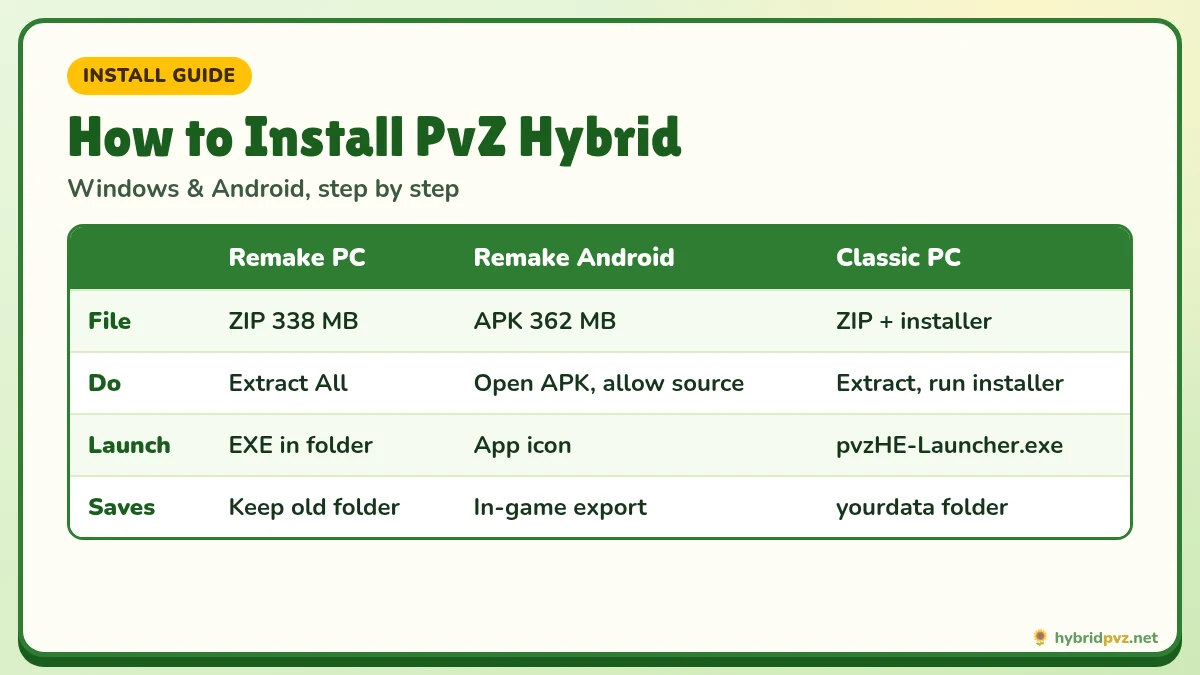
Quick info
Android
Install the APK
Allow unknown apps once
Windows
Extract the ZIP
Run the game .exe
Verify
Check SHA-256
Before you install
Saves
Back up first
Before every update
On this page
- Before you start
- Install at a glance
- Step 1: Verify your download
- Install PvZ Hybrid Remake 0.30 on Windows
- Install PvZ Hybrid Remake 0.30 on Android
- Install PvZ Hybrid Classic 3.18 on Windows
- Step 2: First launch checklist
- Step 3: Back up your saves
- Updating later
- If something goes wrong
- Check the SHA-256 hash on any device
- Common install mistakes
- Frequently asked questions
Installing PvZ Hybrid takes about five minutes once you know which package you have. This guide covers all three setups: Remake 0.30 on Windows, Remake 0.30 on Android and Classic 3.18 on Windows. The Remake on PC is “extract and run”, Classic uses an installer, and Android uses an APK.
🛡️ Before you start
- Pick the right file. Phone: Remake APK. PC: Remake ZIP or Classic ZIP. There is no Classic for Android and no version for iPhone. Not sure? Read Remake vs Classic.
- Get it from the download page, which lists file size and SHA-256 for each file.
- Back up any existing saves if you are updating.
Install at a glance
Step 1: Verify your download
A matching hash proves your file is identical to the one we published and was not corrupted or tampered with.
- Open the Start menu, type PowerShell and open it.
- Run:
Get-FileHash "C:\Users\YourName\Downloads\filename.zip" -Algorithm SHA256 - Compare the long code with the SHA-256 on the download page. Every character should match. If not, download again.
Install PvZ Hybrid Remake 0.30 on Windows
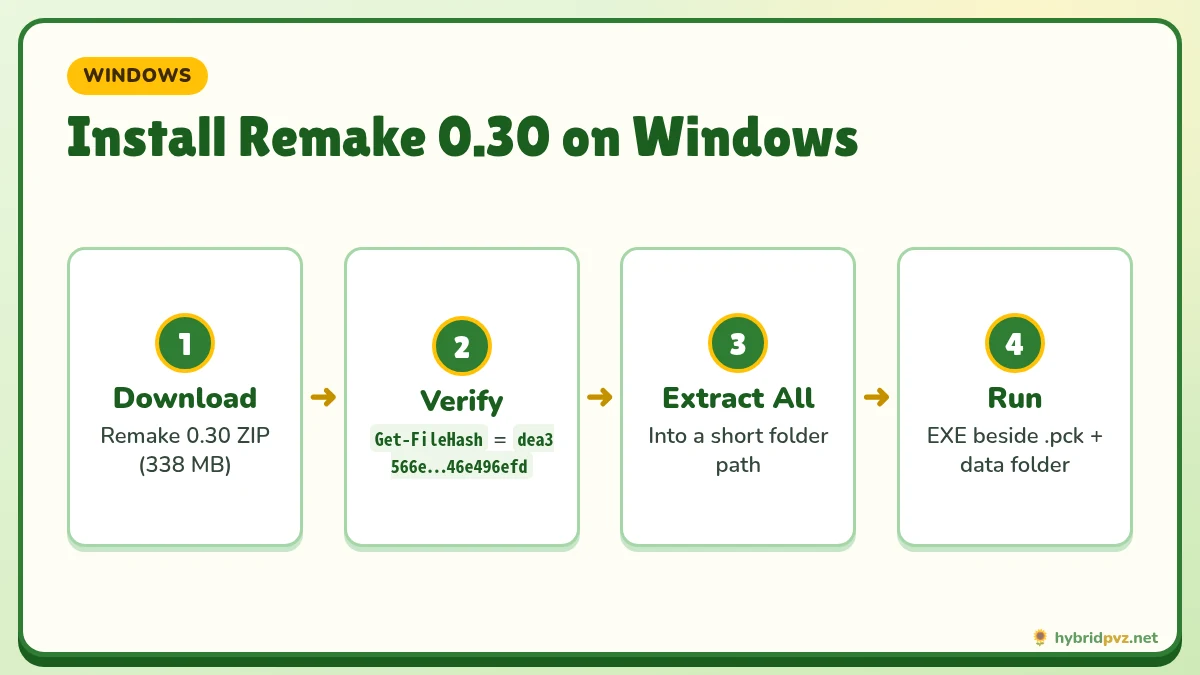
- Extract the ZIP. Right-click the file → Extract All → choose a folder such as
D:\Games\PvZ Hybrid Remake 0.30. Do not run the game from inside the ZIP preview. - Open the extracted folder. It is named 植物大战僵尸杂交重制版 (“PvZ Hybrid Remake”).
- Check the files are together. You should see the game EXE (植物大战僵尸杂交版发布版0.30.0.Csharp.exe), a matching
.pckfile, and adata_PlantsVsZombies_windows_x86_64folder. - Run the EXE. If SmartScreen appears, click More info → Run anyway (only if your hash matched).
- Create a shortcut with right-click → Send to → Desktop. Never move the EXE alone.
Install PvZ Hybrid Remake 0.30 on Android
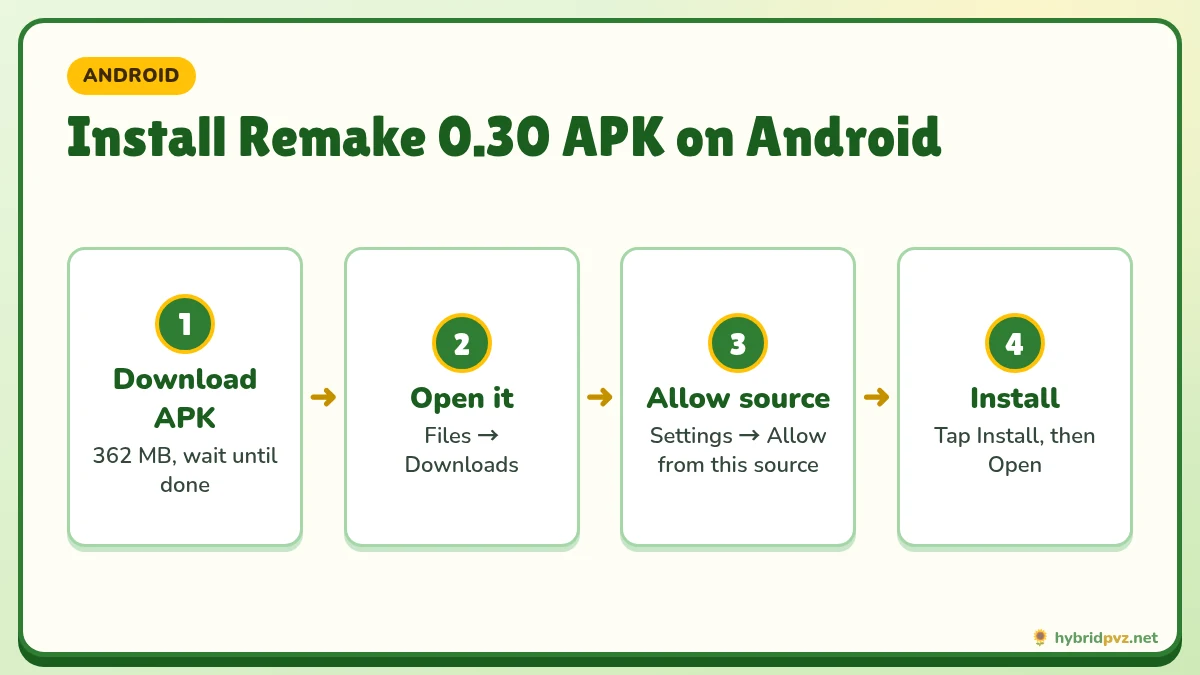
- Download the APK on your phone.
- Tap the finished download (or find it in Files → Downloads).
- When Android blocks it, tap Settings and enable Allow from this source for your browser or file manager.
- Go back and tap Install. If Play Protect warns you, choose Install anyway only for a verified file.
- Tap Open. Then switch the “install unknown apps” permission off again.
Phone-specific tips and APK errors: PvZ Hybrid APK guide.
Install PvZ Hybrid Classic 3.18 on Windows
- Extract the ZIP. You will get a folder named 植物大战僵尸杂交版v3.18.
- Run the installer 植物大战僵尸杂交版v3.18安装程序.exe (安装程序 means “installer”).
- Follow the prompts. The installer is in Chinese; the buttons follow the usual order: Next (下一步), Browse (浏览) to change the folder, Install (安装), Finish (完成).
- Launch the game from the desktop shortcut or the launcher in the install folder (community guides identify it as
pvzHE-Launcher.exe). Running the installer again will not start the game.
Do not run bundled registry files, DEP scripts or optional patches unless a specific error tells you to. They are not part of normal setup.
Step 2: First launch checklist
- The main menu loads with no error.
- You can start and finish the first level.
- Exit through the menu so the game saves properly.
- If text appears as boxes on Classic, set Windows “Language for non-Unicode programs” to Chinese (Simplified) and restart.
Step 3: Back up your saves
| Edition | Where saves are | How to back up |
|---|---|---|
| Classic (PC) | %ProgramData%\Popcap Games\PlantsVsZombies\pvzHE\yourdata | Close the game, copy the whole yourdata folder to a dated backup. |
| Remake (PC) | Not documented by the creator | Keep your old game folder and use any in-game export before replacing a version. |
| Remake (Android) | Inside the app’s data | Use any in-game export; never uninstall to fix an update error before backing up. |
Updating later
On PC, put each new version in a new folder and keep the old one until the new one works. On Android, install the new APK over the old one. Track new releases on our updates page.
If something goes wrong
| Symptom | Likely cause | Fix |
|---|---|---|
| ZIP won’t open | Incomplete download | Download again and compare the hash. |
| Remake says resources are missing | EXE separated from .pck/data folder | Extract a fresh copy and run it in place. |
| Classic install finished, game didn’t open | Ran installer, not launcher | Use the shortcut or launcher in the install folder. |
| Android “App not installed” | Storage or signature conflict | Free space; see the APK guide before uninstalling. |
Still stuck? Visit PvZ Hybrid not working or contact us with your edition, version, OS and the exact error text.
Check the SHA-256 hash on any device
| Device | How |
|---|---|
| Windows | PowerShell: Get-FileHash "path\to\file" -Algorithm SHA256 |
| macOS / Linux | Terminal: shasum -a 256 file or sha256sum file |
| Android | Use a hash checker app from the Play Store |
If the hash doesn’t match, delete the file and download it again.
Common install mistakes
- Running the game from inside the ZIP preview, without extracting it first.
- Moving only the .exe and leaving its .pck file and data folder behind.
- Uninstalling the Android app to “fix” an update error. This deletes your saves.
- Mixing Classic translation files into Remake.
- Installing into
C:\Program Files, where the game may not be able to write its files.
FAQs
How do I install PvZ Hybrid on PC?
For Remake, extract the ZIP and run the EXE in place. For Classic, extract the ZIP and run the installer, then launch from the shortcut.
How do I install PvZ Hybrid on Android?
Download the Remake APK, allow installs from your browser or file manager, and tap Install.
Can I install PvZ Hybrid on iPhone?
No. There is no official iOS version.
Do I need the original Plants vs. Zombies?
No. Both editions are standalone.
Why won’t the game start after installing Classic?
You likely re-opened the installer. Launch the game from its shortcut or launcher instead.
Is it safe to click “Run anyway” in SmartScreen?
Only if your file’s SHA-256 matches the one on our download page.
How long does installation take?
Usually under five minutes after the download finishes.
Do I need to install the original PvZ first?
No. Both editions come with everything they need.
How long does installation take?
Usually a few minutes after the download finishes. Extracting the 338 MB ZIP is quick on an SSD.
Can I install PvZ Hybrid on an SD card?
On Android, it depends on your phone. On PC, any folder you can write to works.
Does PvZ Hybrid need administrator rights?
Not if you extract it into a folder you can write to, like C:\Games.
Keep exploring
If something goes wrong
Language and fonts
Pick an edition
Files and checksums