
PvZ Hybrid Not Working? Fix Crashes & Errors
Step-by-step fixes for crashes, black screens, missing resources, garbled text and install errors.
Unofficial fan site · All credit for PvZ Hybrid to 潜艇伟伟迷
Quick info
Crashes
Re-extract cleanly
Fresh folder, short path
App not installed
Check the APK
Free space and SHA-256
Garbled text
Locale and fonts
Common on Windows
Corrupt file
Compare SHA-256
Re-download if different
On this page
- Before anything else: three quick checks
- Fix flow at a glance
- Windows: Remake 0.30 problems
- Windows: Classic 3.18 problems
- Antivirus and SmartScreen
- Android: Remake APK problems
- Translation-related crashes
- Level Editor problems
- Still not working? Send us a useful report
- Quick fixes table
- Crash fixes from recent updates
- Frequently asked questions
PvZ Hybrid not opening, crashing or showing strange text? Most problems come from a handful of causes: an incomplete download, a partly extracted ZIP, running the installer instead of the game, antivirus removing a file, or mixing files from different versions. Find your symptom below. This guide covers Remake 0.30 (Windows and Android) and Classic 3.18 (Windows).
Before anything else: three quick checks
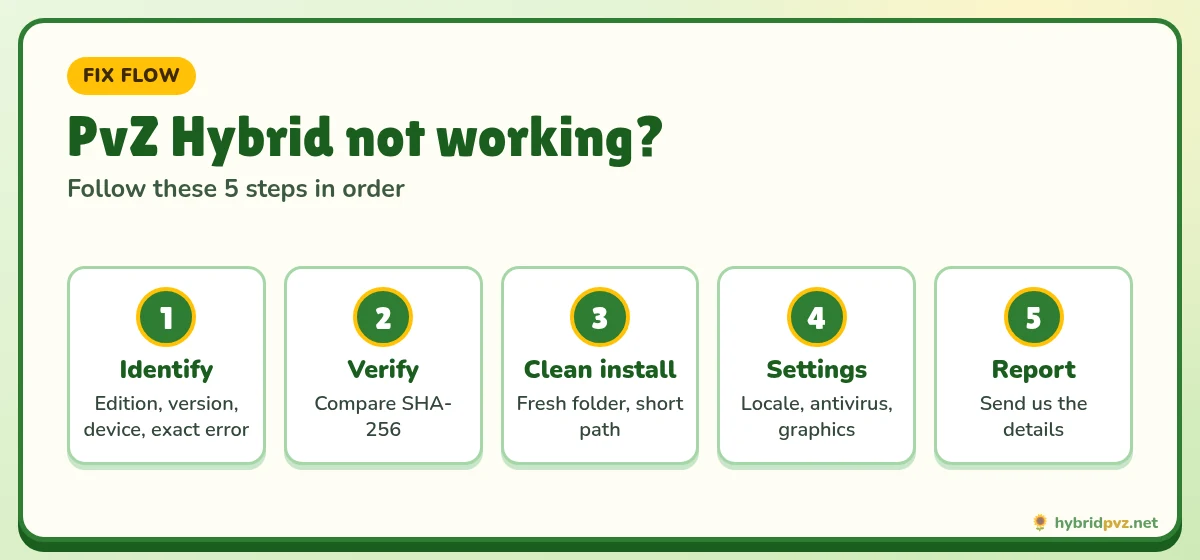
- Which edition and version? Remake and Classic need different fixes. Note the exact version (e.g. Remake 0.30).
- Is the download complete? Compare the file’s SHA-256 with the value on our download page:
Get-FileHash "path\to\file.zip" -Algorithm SHA256in PowerShell. - Back up your saves before trying fixes. Classic saves:
%ProgramData%\Popcap Games\PlantsVsZombies\pvzHE\yourdata.
Fix flow at a glance
Windows: Remake 0.30 problems
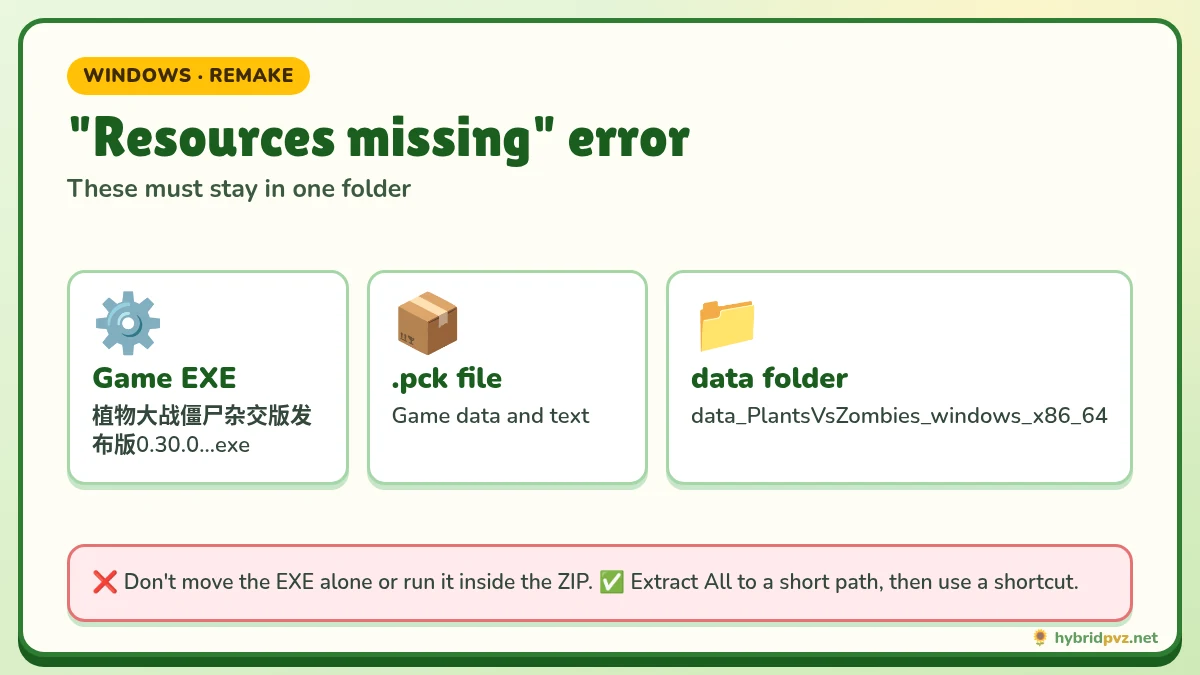
Game says resources or files are missing
The Remake EXE must sit next to its .pck file and the data_PlantsVsZombies_windows_x86_64 folder. This error almost always means the EXE was moved, copied alone, or run from inside the ZIP.
- Delete the broken folder.
- Right-click the ZIP → Extract All to a short path like
D:\Games\PvZRemake. - Run the EXE from inside that folder. Use a shortcut if you want it on your desktop.
Black screen or instant crash on launch
- Update your graphics driver from NVIDIA, AMD or Intel. Godot-based games fail on outdated drivers.
- On laptops with two GPUs, set the game to use the high-performance GPU (Settings → System → Display → Graphics).
- Make sure you are on 64-bit Windows. The Remake does not run on 32-bit.
- Move the folder out of OneDrive or other synced folders, which can lock files.
- Paths with unusual characters occasionally cause trouble; try a plain path such as
D:\Games\PvZRemake.
Lag in late waves
Plug in your laptop, use the Best performance power mode, close browsers and recording software, and update graphics drivers.
Windows: Classic 3.18 problems
Installer finished but the game won’t open
The file named 安装程序.exe is the installer, not the game. Launch the game from the desktop shortcut or the launcher inside the install folder (community guides name it pvzHE-Launcher.exe).
Text shows as boxes, question marks or gibberish
- Settings → Time & language → Language & region → Administrative language settings.
- Change system locale → Chinese (Simplified, China).
- Restart Windows.
Game window is tiny or blurry
Right-click the game EXE → Properties → Compatibility → Change high DPI settings → tick “Override high DPI scaling behavior”. You can also try compatibility mode for an older Windows version.
Lost progress after updating
Classic keeps saves outside the game folder. Restore your backed-up yourdata folder to the path above. If you didn’t back up, check whether the old folder still exists there before reinstalling anything.
Should I run the bundled registry or DEP files?
Not as routine setup. Only use an optional fix if it targets the exact error you see, and understand what it changes first.
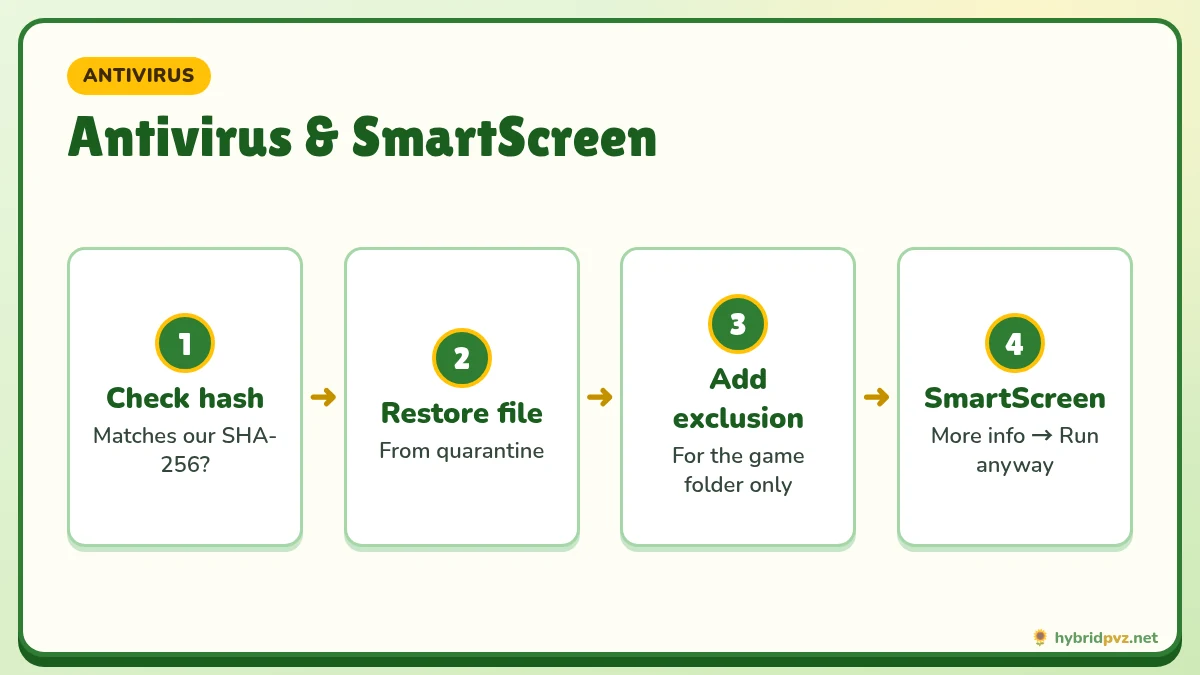
🛡️ Antivirus and SmartScreen
Fan games are not code-signed, so Windows SmartScreen and some antivirus tools flag them. If your hash matches our published SHA-256:
- SmartScreen: click More info → Run anyway.
- Windows Security: Protection history → find the item → Restore, then add an exclusion for the game folder.
If the hash does not match, do not restore anything. Delete the file and download it again from a trusted page.
Android: Remake APK problems
| Error | Cause | Fix |
|---|---|---|
| “App not installed” | Low storage, incomplete file, or a copy from another source signed differently | Free space and re-download. For a signature conflict, back up progress first; uninstalling deletes local data. |
| “Problem parsing the package” | Corrupt download or Android too old | Re-download fully; check your Android version. |
| Install blocked | Unknown-apps permission off | Allow installs for your browser or file manager, then turn it off after. |
| Crash on launch | Low memory or bad download | Restart the phone, close apps, reinstall over the top. |
| Play Protect warning | App not from Play Store | Expected for fan games; continue only with a verified file. |
Full APK guide: PvZ Hybrid APK for Android.
Translation-related crashes
A translation pack made for a different version is one of the most common causes of crashes after an update. Remove the patch by restoring a clean copy of the game. Only use patches that name your exact version. See the English guide.
Level Editor problems
If a custom level won’t load, make sure the editor and game versions match (editor 0.30 with Remake 0.30). See the Level Editor page.
Still not working? Send us a useful report
Contact us with: edition and version, Windows or Android version, the file name you downloaded, the exact error text or a screenshot, and what you did just before it happened. Please don’t send save files, executables or account details.
Quick fixes table
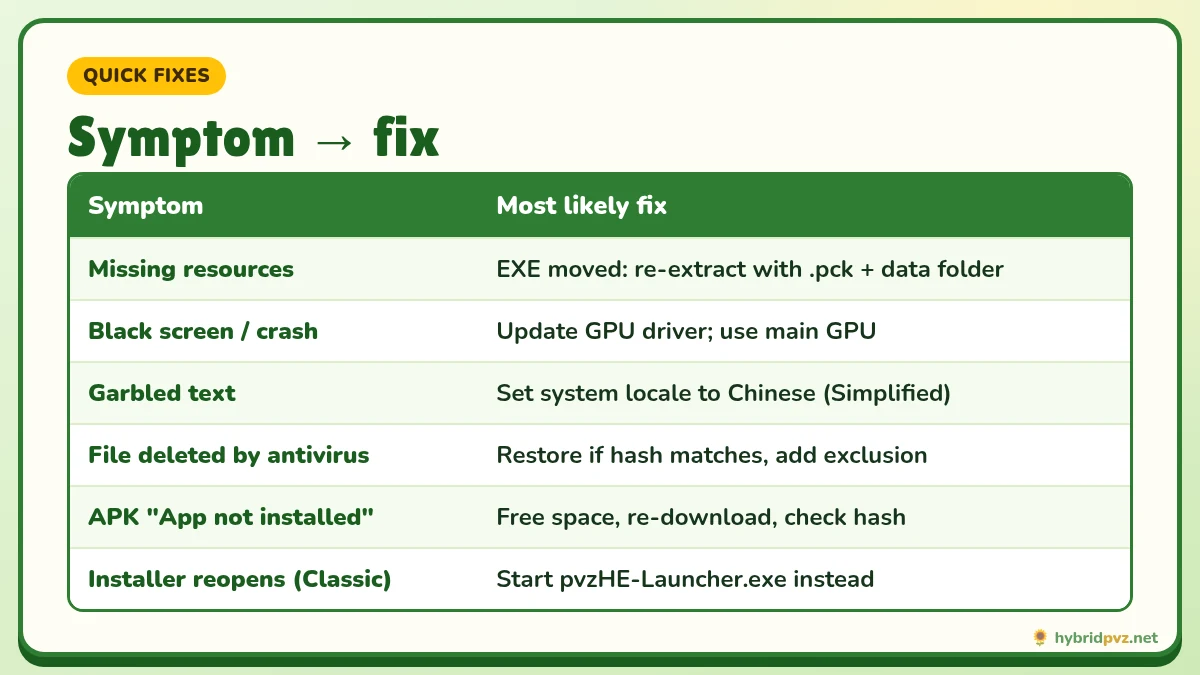
| Symptom | Most likely cause | Fix |
|---|---|---|
| Game closes right after launch | Incomplete extraction or missing .pck | Extract a fresh copy into C:\Games\PvZHybrid |
| Black screen | Graphics driver or fullscreen mode | Update your GPU driver and try windowed mode |
| Squares instead of text | System locale | Set the locale to Chinese (Simplified) |
| “App not installed” (Android) | Low storage, broken APK or signature conflict | Free up space, check SHA-256, and keep your existing app |
| Save won’t load | Edition or version mismatch | Use the version that created the save |
| Crash on Winlator | Emulator settings | Box64 Stability, switch DXVK/WineD3D, 1280×720 |
Crash fixes from recent updates
Some crashes go away when you update. Classic 3.19 fixed a crash caused by Torchwood. Remake 0.31 fixed repeated level-clear screens, wrong save restores and touch reselect bugs. Before you troubleshoot further, check that you’re on the newest build.
FAQs
Why is PvZ Hybrid not opening?
Usually a partly extracted ZIP (Remake), launching the installer instead of the game (Classic), or antivirus quarantining a file.
How do I fix the black screen in PvZ Hybrid Remake?
Update graphics drivers, use the high-performance GPU, confirm 64-bit Windows and run from a plain, non-synced folder.
Why does PvZ Hybrid show weird characters?
Set Windows’ system locale to Chinese (Simplified) and restart.
Why won’t the APK install?
Low storage, an incomplete download, a blocked unknown-apps permission or a signature conflict with a copy from another site.
Is PvZ Hybrid a virus?
The creator’s builds are not. Antivirus warnings are typical for unsigned fan games, but always verify the SHA-256 hash.
I updated and lost my progress. What now?
Restore your save backup. For Classic, check the yourdata folder under ProgramData before reinstalling.
Why does PvZ Hybrid keep crashing?
Most crashes come from an incomplete extraction, an outdated build, translation files mixed in from another version, or graphics driver problems. Work through the table above.
Why is PvZ Hybrid showing a black screen?
Update your graphics driver, try windowed mode and close any screen overlays. On Winlator, switch between DXVK and WineD3D.
Is it safe to turn off antivirus for PvZ Hybrid?
Don’t turn it off completely. Compare the SHA-256, and if it matches, add only the game folder as an exception.
My saves disappeared after updating. Can I get them back?
On Classic, check %ProgramData%\Popcap Games\PlantsVsZombies\pvzHE\yourdata. On Android, if you uninstalled the app, its saves are usually gone unless you backed them up.
Keep exploring
Clean setup steps
Locale and font fixes
Fixed in newer builds
Re-download a clean copy