
PvZ Hybrid English Version Guide
How fan translations work, how to install them safely and how to play in Chinese.
Unofficial fan site · All credit for PvZ Hybrid to 潜艇伟伟迷
Quick info
Official language
Chinese
All editions
English
Fan translations
Vary by version
Match versions
Patch = build
Use the exact version
Free and safe
100% free
SHA-256 on every hosted file
On this page
- Official language status
- Why “English version” downloads are risky
- How fan translations usually work
- Installing a translation safely (general steps)
- Playing PvZ Hybrid in Chinese: a quick menu guide
- Use your phone’s camera to translate
- Fix garbled Chinese text on Windows
- Plant names in English
- Which edition is easier to play without English?
- Are you a translator?
- Known English builds and patches
- How to spot a fake English version
- Fixing boxes and garbled characters
- Playing in Chinese: a quick icon guide
- Frequently asked questions
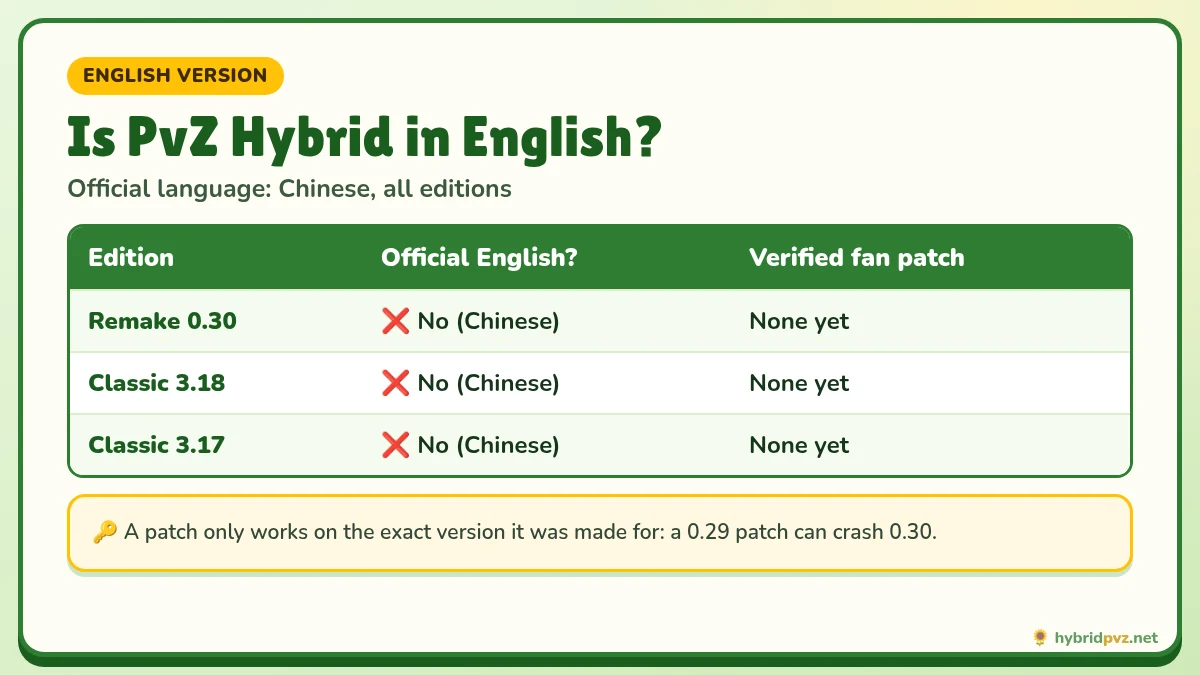
One of the most searched questions about the mod is simple: is there a PvZ Hybrid English version? The honest answer is that PvZ Hybrid is made by a Chinese creator, 潜艇伟伟迷, and the official releases of both Remake and Classic are in Chinese. English play is possible through community fan translations for some versions, and the game is also very playable in Chinese once you know the menus. This guide explains both routes.
Official language status
| Edition | Current version | Official English? | Fan translation |
|---|---|---|---|
| Remake | 0.30 | No (Chinese) | None we can verify yet |
| Classic | 3.18 | No (Chinese) | None we can verify yet |
| Classic | 3.17 | No (Chinese) | None we can verify yet |
We only list a translation after testing it with the exact game version. If a cell says “verify”, we have not confirmed a working pack yet.
Why “English version” downloads are risky
Search for “PvZ Hybrid English download” and you will find many full game packages claiming to be translated. Some are genuine fan work. Others are old builds renamed with a new version number, or repacks that bundle adware. Before installing a translated package:
- Check that it names the exact base version (e.g. “Remake 0.30” or “Classic 3.18”), not just “latest”.
- Prefer a translation patch you apply to the official game over a full re-uploaded game.
- Check the translator is credited and has a public page or video showing the work.
- Scan the files and never run unexplained scripts or registry files.
How fan translations usually work
Remake (Godot engine)
The Remake stores its text and images inside a Godot .pck resource file next to the game EXE. A Remake translation normally replaces that resource file, or ships a full pre-patched folder. That means a translation made for one Remake version generally will not work on another: a 0.29 translation pack can break or crash 0.30 because the resource layout changes with every update.
Classic
Classic translations replace text and image assets in the installed game folder. Again, they are tied to a specific version. A pack for 3.17 may show untranslated text, wrong images or errors on 3.18.
🛡️ Installing a translation safely (general steps)
- Install the official game first from our download page and confirm it runs.
- Make a full copy of the game folder (and back up saves; Classic saves are in
%ProgramData%\Popcap Games\PlantsVsZombies\pvzHE\yourdata). - Confirm the patch version matches your game version exactly.
- Apply the patch to the copy, following the translator’s instructions.
- Test the menu and a few levels. If it crashes, go back to your untouched copy.
Playing PvZ Hybrid in Chinese: a quick menu guide
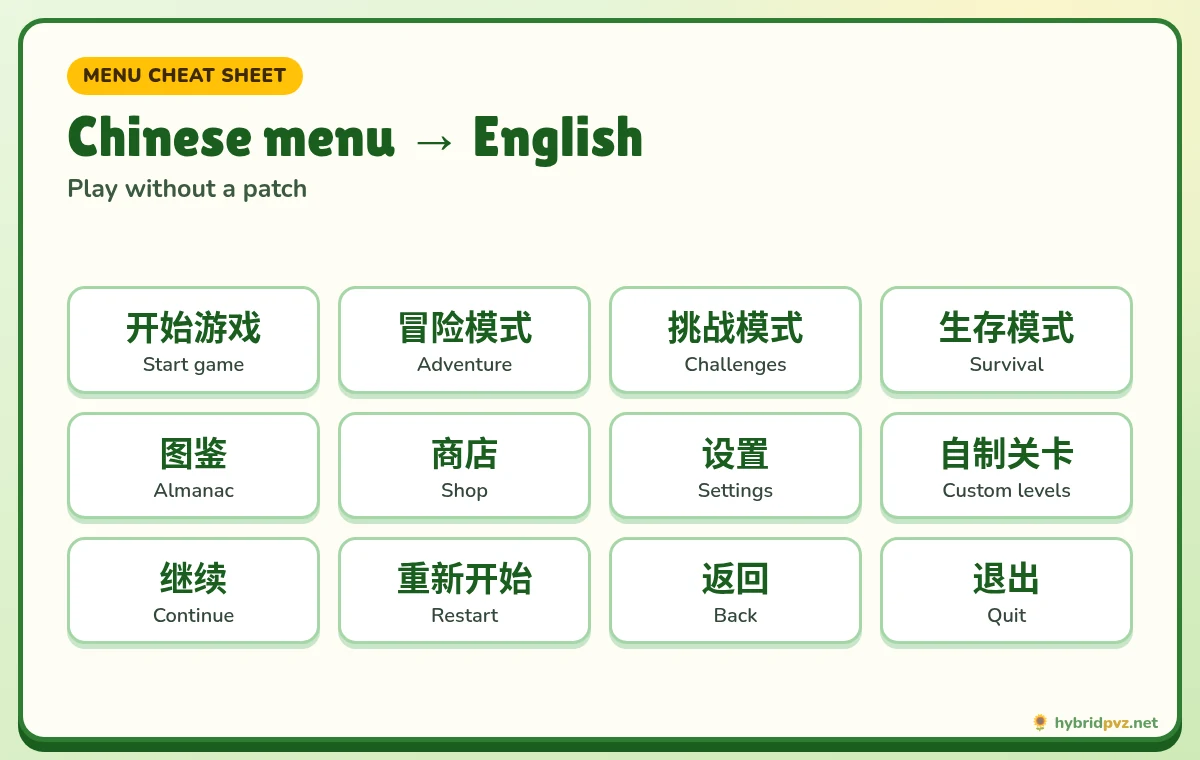
If no translation exists for the newest version, many players simply play in Chinese. The gameplay is visual, and you only need a handful of words:
| Chinese | English |
|---|---|
| 开始游戏 / 开始 | Start game / Start |
| 冒险模式 | Adventure mode |
| 选项 / 设置 | Options / Settings |
| 继续 | Continue |
| 重新开始 | Restart |
| 返回 | Back |
| 退出 | Quit |
| 确定 / 取消 | OK / Cancel |
| 植物 / 僵尸 | Plants / Zombies |
| 图鉴 | Almanac |
| 商店 | Shop |
| 关卡 | Level / Stage |
Use your phone’s camera to translate
Google Lens (Android) or the Google Translate app’s camera mode can translate plant descriptions in real time. Point the camera at your screen, or on Android take a screenshot and open it in Google Lens. This works for any version on day one, with no files to install.
Fix garbled Chinese text on Windows
If Classic shows boxes, question marks or random symbols instead of Chinese characters, Windows is using the wrong code page:
- Open Settings → Time & language → Language & region → Administrative language settings.
- Click Change system locale and choose Chinese (Simplified, China).
- Restart your PC.
This does not change your Windows display language. You can switch it back later.
Plant names in English
Because translations differ, the same hybrid plant may have several English names online. On our plants and zombies list we show the Chinese name next to the English name so you can match them in any version.
Which edition is easier to play without English?
Most players find the Remake slightly easier to follow in Chinese, because its newer interface leans on icons, and chapters are clearly numbered (for example stages 10-11 to 10-20 in Magic Garden). Classic follows the layout of the original 2009 game, so if you have played Plants vs. Zombies before, you will recognise where every menu leads even without reading it. In both editions, the seed packets show plant art and sun cost, so you can learn a hybrid plant simply by placing it in an early level or, in Remake 0.30, by testing it in sandbox battles.
Are you a translator?
If you maintain a PvZ Hybrid translation for the current Remake or Classic version, contact us. We will test it, credit you by name and link to your page.
Known English builds and patches
| Build | Edition | Source type | Notes |
|---|---|---|---|
| 3.6 English | Classic | GameBanana / itch.io (by burkinaphimos2) | The first widely shared English version. It’s old now. |
| English 2.0.88 | Classic | GitHub release (nextisme) | 114 MB ZIP from October 2024. |
| “3.9.9 English”, “4.0” | Unclear | Various mirrors | Claims we can’t verify. Be careful with these. |
| Remake 0.30 | Remake | Creator | Official text is Chinese. |
How to spot a fake English version
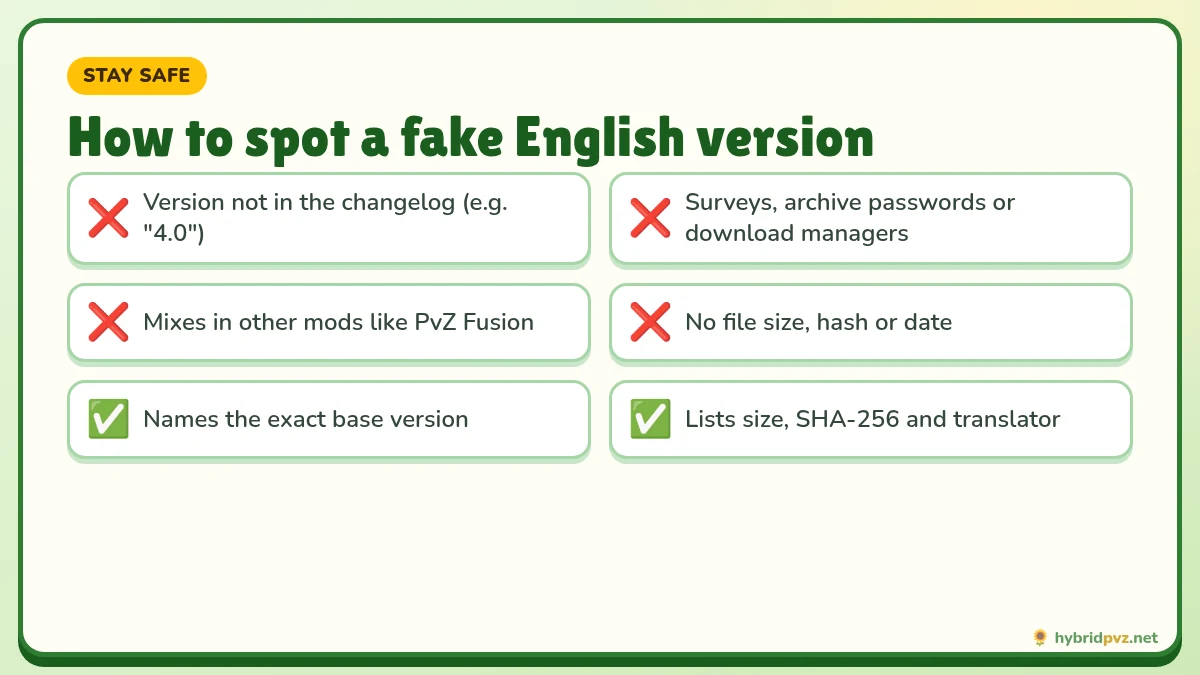
- The version number doesn’t exist in the creator’s changelog, like “PvZ Hybrid 4.0”.
- It asks for surveys or archive passwords, or wants you to install a download manager.
- The description mixes in other mods, like PvZ Fusion, or lists features that sound too good to be true.
- The page has no file size, hash or release date.
Fixing boxes and garbled characters
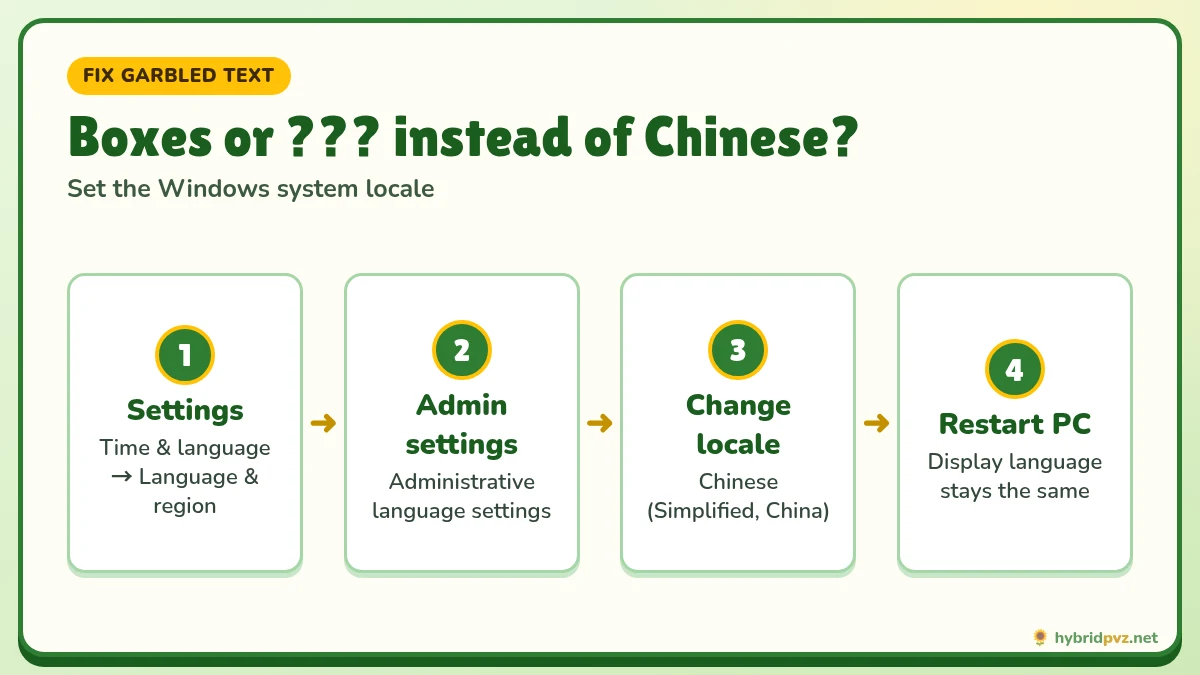
If menus show squares or garbled text, Windows is missing the Chinese language settings it needs. In Windows, open Settings → Time & language → Language & region → Administrative language settings, set the system locale to Chinese (Simplified, China), and restart. Change it back when you’re done if you prefer.
Playing in Chinese: a quick icon guide
| Chinese | English |
|---|---|
| 开始游戏 | Start game |
| 冒险模式 | Adventure |
| 挑战模式 | Challenges |
| 生存模式 | Survival |
| 图鉴 | Almanac |
| 商店 | Shop |
| 设置 | Settings |
| 自制关卡 | Custom levels |
FAQs
Is there an official English version of PvZ Hybrid?
No. Both Remake and Classic are officially released in Chinese.
Can I play PvZ Hybrid in English?
Yes, with a fan translation made for your exact version, or by using a camera translator while playing in Chinese.
Does a 0.29 English patch work on 0.30?
Usually not. Translations are tied to a specific version and can crash on another.
Is the Android APK available in English?
The official APK is Chinese. Check the status table above for verified translations.
Why does PvZ Hybrid show weird symbols?
Set Windows’ system locale for non-Unicode programs to Chinese (Simplified) and restart.
Are “English version” full downloads safe?
Not always. Prefer a credited patch applied to the official game, and verify files before running them.
Is there an official English version of PvZ Hybrid?
No. The creator makes the game in Chinese. English versions are fan translations.
Is PvZ Hybrid 4.0 real?
There’s no Classic 4.0 in the creator’s changelog. The newest Classic version is 3.19.
Will an English patch for 3.6 work on 3.18?
No. A patch only works on the exact version it was made for. Using the wrong one can crash the game or break your saves.
Is PvZ Hybrid the same as PvZ Fusion?
No. PvZ Fusion is a different fan mod made by a different creator.
Keep exploring
Step-by-step setup
Garbled text and crashes
Translated plant names
Files and checksums